 Ruben Buijs
RICE prioritization helps you rank product ideas using Reach, Impact, Confidence, and Effort. The formula is simple. The hard part is agreeing on honest inputs and knowing when the result should not decide your roadmap.
This guide follows one SaaS backlog from three competing requests to a real product decision. You will see the numbers, the assumptions behind them, and the moment when the team chooses not to follow the ranking blindly.
RICE score = (Reach x Impact x Confidence) / Effort
You can also watch the short overview first:
- What RICE prioritization is actually for
- Meet the backlog
- Step 1: Give every request the same Reach unit
- Step 2: Define Impact before assigning it
- Step 3: Use Confidence as an evidence discount
- Step 4: Count the whole Effort
- Step 5: Calculate the complete RICE score
- A score is not a roadmap decision
- How to run a useful RICE session
- Spreadsheet or prioritization tool?
- Where AI helps with RICE
- Why RICE rankings go wrong
- RICE versus ICE and other frameworks
- RICE checklist
- From ranking to roadmap
- Frequently asked questions
What RICE prioritization is actually for
RICE is a prioritization framework created by Intercom to compare different product ideas with one consistent scoring method. Intercom's original explanation introduced four factors:
- Reach: How many people or events will this affect in one fixed period?
- Impact: How much will it help the outcome you care about?
- Confidence: How strong is the evidence behind your estimates?
- Effort: How much work will the whole team spend?
Multiply Reach, Impact, and Confidence. Divide the result by Effort. A higher score means more expected value for the work.
That sounds objective. It is not.
Reach can come from analytics. Effort can come from the people doing the work. Impact still depends on your goal, and Confidence is still a judgment about evidence. RICE does not remove judgment. It forces the team to show where judgment entered the decision.
A score without a written assumption is just an opinion wearing a decimal point.
That is the useful part of RICE. The number gives the conversation a structure. It does not end the conversation.
Meet the backlog
Imagine a SaaS company with 2,000 active customer accounts. The product team has one quarter of capacity and three requests are competing for it:
- Team roles: Let account owners control what colleagues can see and change
- Bulk CSV export: Let customers export many records at once
- Enterprise SSO: Let larger customers sign in through their identity provider
Each request has a convincing advocate.
Support says Team roles would stop a steady stream of permission questions. Customer success says Bulk CSV export would remove hours of manual work. Sales says Enterprise SSO is blocking valuable deals.
All three statements can be true. The team still cannot build everything first.
Before anyone enters a score, the team agrees on two rules:
- The time period is the next quarter
- Impact means progress toward activation and retention, not revenue alone
Without those rules, every person can produce a defensible score and the final ranking will be nonsense.
Step 1: Give every request the same Reach unit
Reach is the number of people or events affected during one fixed period. It is not a 1 to 10 feeling.
You can use customers per quarter, accounts per month, support conversations per week, or another count. The unit matters less than consistency. Never compare monthly Reach for one request with annual Reach for another.
To start scoring, open the prioritization module and filter the backlog to unscored requests. Customer votes and conversion data remain visible beside the empty RICE fields, so you can inspect the evidence before entering a number.
For our backlog, the team uses affected accounts per quarter.
Team roles Reach: 900 accounts
Product analytics show that 900 accounts have more than one active team member. Those accounts will see the new controls during the quarter.
Reach = 900 accounts
Bulk CSV export Reach: 400 accounts
Analytics show that about 400 accounts export data or copy large result sets during a typical quarter.
Reach = 400 accounts
Enterprise SSO Reach: 100 accounts
Only 100 current and late stage enterprise accounts require SSO during the selected quarter.
Reach = 100 accounts
| Request | Reach per quarter | Evidence |
|---|---|---|
| Team roles | 900 | Accounts with multiple active team members |
| Bulk CSV export | 400 | Accounts using export-heavy workflows |
| Enterprise SSO | 100 | Current and late stage enterprise accounts requiring SSO |
Enter 900, 400, and 100 in the Reach column. All three numbers now use the same quarterly unit.
Notice what happened. Sales brought the loudest request, but it has the smallest Reach. That does not make the request unimportant. It means the team can now see the tradeoff.
When Reach is harder to calculate
Sometimes you need a small model instead of a direct count.
If 500 people enter a signup step each month, 30% choose the affected option, and the period is one quarter:
Reach = 500 x 30% x 3 months = 450 people per quarter
Write the calculation next to the score. If the conversion rate changes later, the team can update the input without repeating the whole debate.
Step 2: Define Impact before assigning it
Impact asks how much a request helps the outcome the team selected. It is not a synonym for "this customer really wants it."
The original RICE model uses a small multiplier scale:
| Impact description | Score |
|---|---|
| Massive impact | 3 |
| High impact | 2 |
| Medium impact | 1 |
| Low impact | 0.5 |
| Minimal impact | 0.25 |
The scale only works when the team defines what impact means. "Impact on activation" and "Impact on enterprise revenue" can produce different rankings from the same backlog.
Our team selected activation and retention as the quarter's goal:
- Team roles gets 2: Permission control helps multi-user accounts adopt the product safely
- Bulk CSV export gets 1: It removes friction from an important workflow, but does not transform adoption
- Enterprise SSO gets 3: For affected enterprise accounts, SSO can decide whether they adopt or retain the product at all
Enter 2, 1, and 3 in the Impact column. Keep the reason for each score beside the request so the team can challenge it later.
The strongest Impact score goes to SSO. Its Reach is still lower. RICE keeps both truths in the model.
My rule is simple: every Impact score of 2 or 3 needs one written sentence and one piece of evidence. Strong claims should be easier to inspect, not easier to hide.
Step 3: Use Confidence as an evidence discount
Confidence is where RICE admits that your estimates can be wrong.
Use 100% when Reach, Impact, and Effort have strong evidence. Use 80% when one important input is less certain. Use 50% when the idea is mostly a reasoned guess. Below 50%, stop polishing the spreadsheet and research the request first.
| Confidence | What it means | Example evidence |
|---|---|---|
| 100% | Strong evidence across the important inputs | Analytics, customer research, and an engineering estimate agree |
| 80% | Good evidence with one meaningful uncertainty | Reach and Effort are measured, but expected Impact is estimated |
| 50% | A plausible idea with weak evidence | A few conversations and rough sizing |
Our backlog gets these Confidence values:
- Team roles gets 80%: Reach is measured, but the retention effect is still an estimate
- Bulk CSV export gets 90%: Product usage and repeated customer requests support the estimate
- Enterprise SSO gets 100%: Named accounts, deal notes, and a technical assessment all agree
Enter 80%, 90%, and 100% in the Confidence column. The percentage now discounts each estimate based on the evidence behind it.
Confidence should not reward the loudest presenter. It should reward better evidence.
This also creates a useful next step. If a promising request loses because Confidence is low, you know what to do. Run interviews, inspect usage, test a prototype, or ask engineering to reduce uncertainty.
Step 4: Count the whole Effort
Effort is the total work required from product, design, engineering, QA, documentation, migration, and anyone else involved.
Measure it in person-months. One person working for one month is 1. Two people working for one month is 2. Use 0.5 for work that takes much less than one person-month.
Keep the estimates rough. RICE needs comparable cost, not a project plan disguised as precision.
The team estimates:
- Team roles needs 3 person-months: Permissions touch the data model, interface, testing, and documentation
- Bulk CSV export needs 1 person-month: The export path exists and needs a larger batch workflow
- Enterprise SSO needs 4 person-months: Identity setup, edge cases, testing, onboarding, and support make it the largest request
Enter 3, 1, and 4 in the Effort column. The backlog now has all four inputs needed for an automatic RICE score.
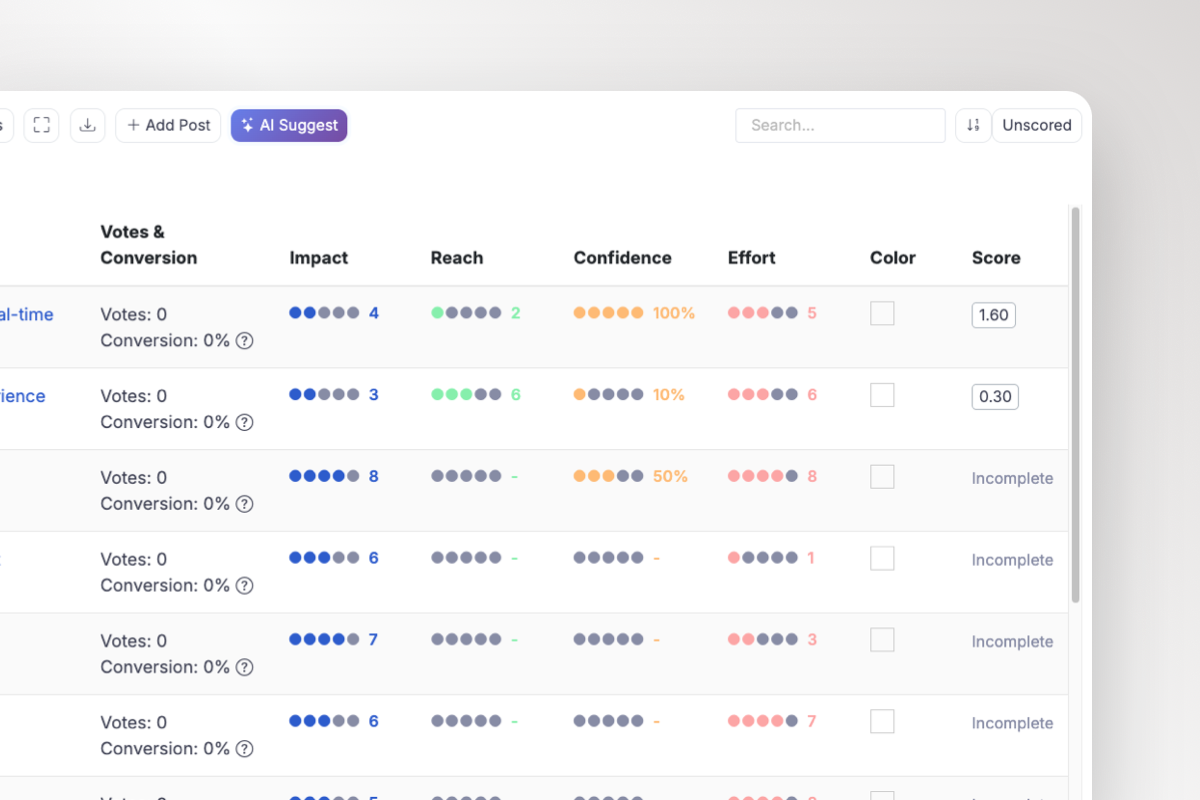
This is the ProductLift prioritization module. The score fields sit in the same live backlog as customer votes and conversion context.
The most common Effort mistake is counting only engineering. A feature that takes two weeks to code and six weeks to migrate, document, and support is not a two week feature.
Step 5: Calculate the complete RICE score
You do not need to calculate these scores by hand. The prioritization module calculates each RICE score automatically as soon as all four inputs are filled. The formulas below show what the module runs and let you audit the result:
Team roles = (900 x 2 x 80%) / 3 = 480
Bulk CSV export = (400 x 1 x 90%) / 1 = 360
Enterprise SSO = (100 x 3 x 100%) / 4 = 75
| Request | Reach | Impact | Confidence | Effort | RICE score |
|---|---|---|---|---|---|
| Team roles | 900 | 2 | 80% | 3 | 480 |
| Bulk CSV export | 400 | 1 | 90% | 1 | 360 |
| Enterprise SSO | 100 | 3 | 100% | 4 | 75 |
Team roles ranks first. Bulk CSV export comes second. Enterprise SSO finishes far behind, even though it has the strongest Impact and Confidence.
When every request has four inputs, click Reorder by Score. The backlog sorts from highest to lowest while votes and conversion context stay beside each result. Switch to the visualization when the team needs to see whether the apparent winner is genuinely high impact or simply easy to build.
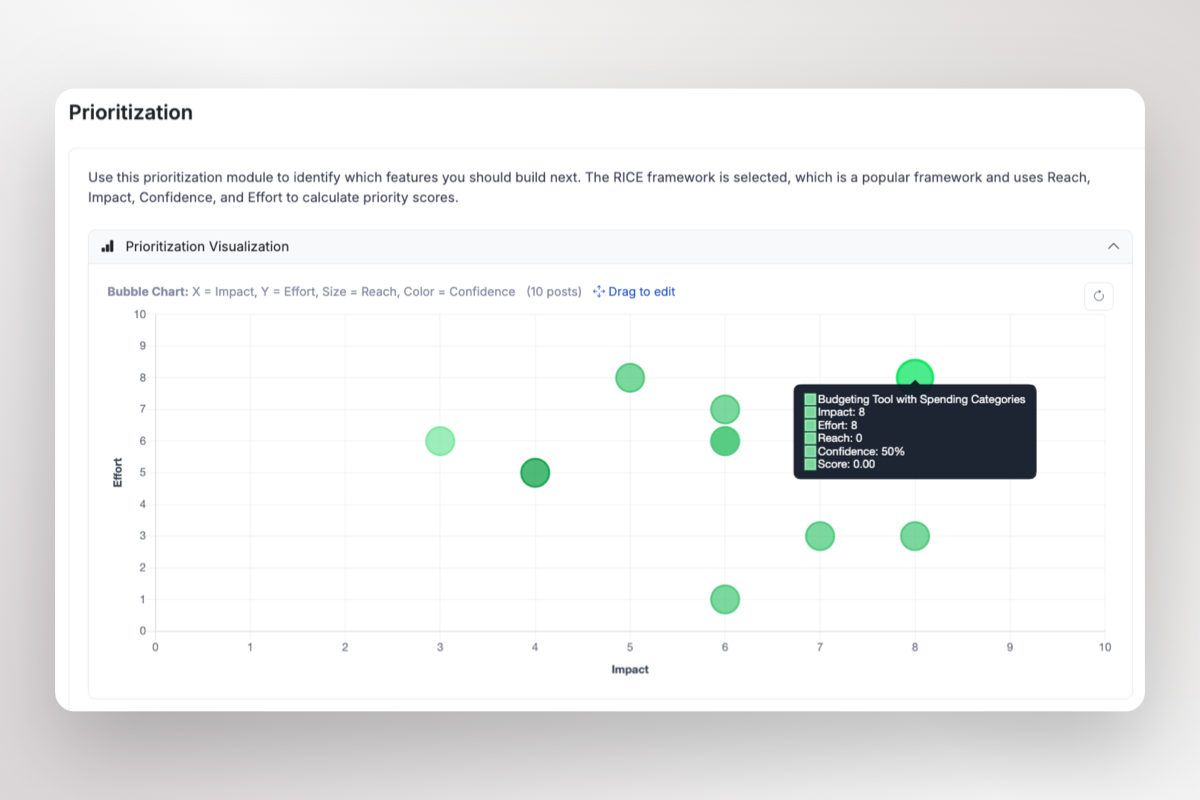
The ProductLift visualization turns the same RICE inputs into a chart you can inspect during a prioritization meeting.
The ranking is the start of the conversation.
It tells the team that Team roles offers the broadest expected benefit for the work. It also exposes why SSO ranked last: low Reach and high Effort. Now the team can discuss that tradeoff instead of repeating three customer quotes and two sales forecasts.
Want to test the same workflow with your own requests? Open the free RICE calculator and edit the example backlog.
A score is not a roadmap decision
Suppose Enterprise SSO is required by a signed contract. If it is not delivered this quarter, the company loses a major customer and breaches a commitment.
The RICE score is still 75. The team should still build SSO first.
Do not edit Reach from 100 to 2,000 until the formula produces the answer you already want. Keep the honest score and record the reason for the override:
Enterprise SSO is scheduled first because of a contractual commitment. Its RICE score remains 75.
That note is more valuable than a fake score. It tells future teammates that the model worked, but a constraint outside the model decided the order.
Common reasons to override RICE include:
- Legal or regulatory obligations
- Security incidents and urgent risk
- Signed customer commitments
- Hard dependencies between projects
- Company strategy that intentionally favors a smaller segment
- Maintenance needed to keep the product reliable
RICE is a value model. It is not a complete operating system for the company.
How to run a useful RICE session
A RICE workshop can take an hour or consume three meetings. The difference is preparation.
Before the session
Ask one owner per request to bring:
- The user problem in one sentence
- Reach evidence for the agreed period
- The expected outcome and Impact rationale
- The evidence supporting Confidence
- A rough cross-functional Effort estimate
Do not spend the meeting discovering that nobody knows how many customers use the workflow.
During the session
Score requests one factor at a time. Enter Reach for every request before moving to Impact. Then do the same for Confidence and Effort. This makes inconsistent units and scales easier to spot.
When people disagree, write the disputed assumption next to the request. "Impact is 2" is hard to challenge. "We expect team permissions to reduce permission-related churn in multi-user accounts" gives the team something real to inspect.
The four factors stay in comparable columns across the backlog. You can spot an unusually optimistic Impact or Confidence score before it quietly changes the order.
After the session
Sort the backlog, then review the top requests for constraints the formula does not include. Record every override. Move selected work to the roadmap and leave the evidence attached.
Scores expire. Update them when the customer base, strategy, evidence, or estimate changes. A Reach calculation from last year is not institutional knowledge. It is an old guess.
Spreadsheet or prioritization tool?
A spreadsheet is enough when the backlog is small, scoring happens occasionally, and one person owns the process. Start with the RICE template overview to choose a format, or go directly to the Excel RICE template or Google Sheets RICE template.
The spreadsheet starts to fail when the score becomes detached from the request:
- Nobody can see which customers voted for it
- Revenue and segment context lives somewhere else
- The Impact rationale disappears behind a number
- Internal discussion moves to Slack or meetings
- The roadmap has no connection to the original evidence
- Customers never hear what happened to their request
In ProductLift's RICE workflow, each score stays with the original request. The team can inspect votes, customer segments, MRR, LTV, comments, and linked posts before selecting inputs. Internal comments and mentions keep the debate with the evidence.
After the decision, the request can move to the roadmap and later into a release. Status changes can notify voters, so prioritization connects to delivery and customer communication.
RICE can also be one view inside a broader feature prioritization tool. That matters when your team wants flexible criteria, customer evidence, and planning in one workflow instead of forcing every decision through one fixed formula.
Once the team commits to a request, change its status to the product roadmap. The same update can notify the people following the request, so the reasoning does not disappear when delivery starts.
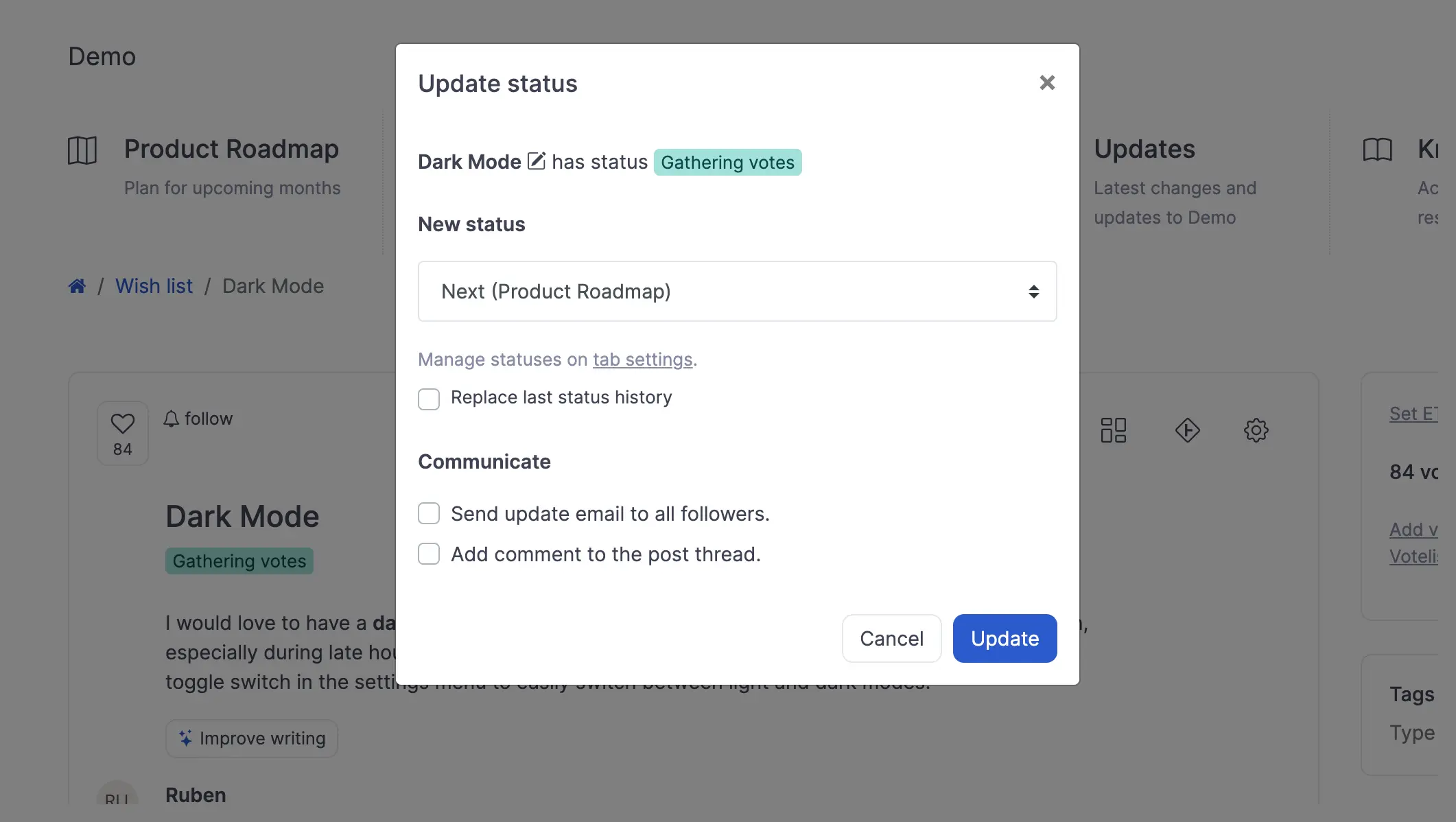
A tool does not make the judgment for you. It stops the judgment, evidence, decision, and delivery plan from becoming four unrelated documents.
Where AI helps with RICE
AI is useful before and after scoring. It is dangerous when it invents the numbers.
AI can help you:
- Find duplicate requests describing the same problem
- Summarize customer comments and supporting evidence
- Draft a score rationale based on the product vision
- Flag requests that use a different Reach period
- Explain why two similar requests received different scores
- Turn the final decision into a stakeholder update
AI should not claim that 900 accounts will use a feature when your analytics do not show that. It should not turn a vague customer quote into 100% Confidence.
To test the model's reasoning, ask for a written reason behind each suggestion. Open the AI prioritization view after scoring and compare its order with the RICE result. Each request gets a draft rationale based on the product vision and request context. Challenge that rationale against the real evidence.
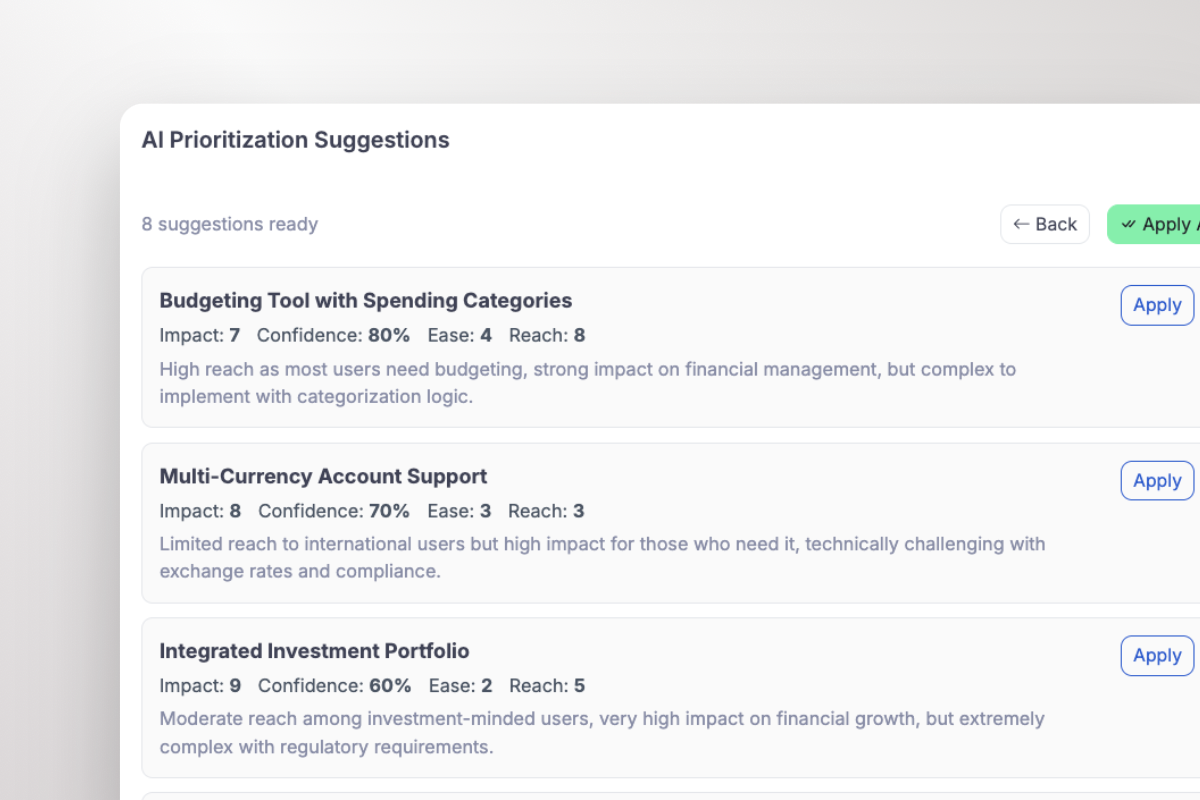
ProductLift shows the draft factors and its reasoning before you apply anything. The team keeps the final decision.
Why RICE rankings go wrong
The formula is rarely the problem. The inputs are.
Mixing time periods
One request uses monthly active users. Another uses all customers reached over a year. The second request wins because it got twelve times more calendar.
Pick one period for the backlog and show it in the column heading.
Scoring different levels of work
"Change button color" competes with "Rebuild the mobile app." Even correct scores will not create a useful comparison.
Compare work at roughly the same level. Split large initiatives or group small tasks before scoring.
Treating Impact as importance
An executive calls a request important, so it gets 3. A support request feels routine, so it gets 0.5. Neither score refers to the selected product outcome.
Define Impact against one goal before looking at request names.
Using Confidence as enthusiasm
The person presenting the idea sounds certain, so the team gives it 100%. Confidence should describe the evidence, not the speaker.
Hiding strategic choices inside the numbers
The team wants SSO first and inflates Reach until it wins. This destroys trust in the whole backlog.
Keep the inputs honest. Override the ranking openly when strategy or commitments require it.
Never updating the scores
A request can gain Reach, lose Impact, become easier to build, or collect stronger evidence. A static ranking becomes a museum of old assumptions.
Review the top of the backlog whenever new evidence changes a factor. You do not need to rescore every idea every Friday.
RICE versus ICE and other frameworks
Use RICE when Reach differs meaningfully between requests and you can measure it with one consistent unit.
Use ICE prioritization when you need a faster first ranking or do not have reliable Reach data. ICE scores Impact, Confidence, and Ease. Our RICE vs ICE comparison applies both methods to the same backlog.
Use an Impact and Effort matrix when the team needs a quick visual conversation instead of a detailed numeric model. Use MoSCoW prioritization when release scope and must-have requirements matter more than a strict ranking.
The best framework is not the one with the most columns. It is the lightest model that exposes the tradeoff your team is currently hiding.
You can compare more options in the prioritization framework guide or use the framework comparison table.
RICE checklist
Before accepting a ranking, check these nine points:
- Every request uses the same Reach unit and period
- Impact refers to one stated outcome
- High Impact scores include a written rationale
- Confidence reflects evidence quality
- Effort includes the whole team and lifecycle work
- Requests are roughly comparable in size
- Assumptions sit next to the scores
- Overrides keep their honest score and a written reason
- The team knows when scores will be reviewed again
If you cannot check an item, the decimal point in the final score will not save you.
From ranking to roadmap
The lesson from our three requests is not that Team roles always beats Enterprise SSO. The lesson is that the team can now explain the choice.
Team roles offered the strongest expected value for the work. Enterprise SSO still moved first because a contract created a constraint outside the formula. Both facts remain visible.
That is successful prioritization. Not blind obedience to a score, and not another meeting where the loudest request wins.
Use the free RICE calculator to rank a few requests now. When the spreadsheet starts losing the customer evidence, discussion, and delivery history, use RICE inside ProductLift to keep the whole decision connected.
Ready to prioritize a live backlog? Start a 14-day ProductLift trial. No credit card is required.
Frequently asked questions
What does RICE stand for?
RICE stands for Reach, Impact, Confidence, and Effort. These four factors estimate the expected value of a product idea relative to the work required.
What is the RICE formula?
Multiply Reach by Impact and Confidence, then divide the result by Effort:
RICE score = (Reach x Impact x Confidence) / Effort
Enter Confidence as a decimal in manual calculations. For example, 80% becomes 0.8.
What is a good RICE score?
There is no universal good score. A score only has meaning compared with other requests that use the same Reach period, Impact scale, Confidence rules, and Effort unit.
Can a lower RICE score be prioritized first?
Yes. Legal work, security issues, signed commitments, dependencies, and deliberate strategy can override the ranking. Keep the original score and document why the team chose a different order.
How often should RICE scores be updated?
Update a score when new evidence changes Reach, Impact, Confidence, or Effort. Review the highest ranked and actively considered requests regularly. There is no value in constantly rescoring abandoned ideas.
Can the RICE model be customized?
You can define a consistent rubric that fits your product. If you add factors or custom weights, call it a custom scoring model so the team does not confuse it with standard RICE.
Does RICE replace customer research?
No. Customer research, product analytics, revenue context, and engineering estimates provide the inputs. RICE organizes that evidence. It cannot create evidence you do not have.
Last updated on Oct 5, 2026